
Defense is the everyday job.
How we watch, harden and recover our own lab, every day, and where AI helps.
By Jason Nevill · Published November 19, 2026 · Last updated November 19, 2026
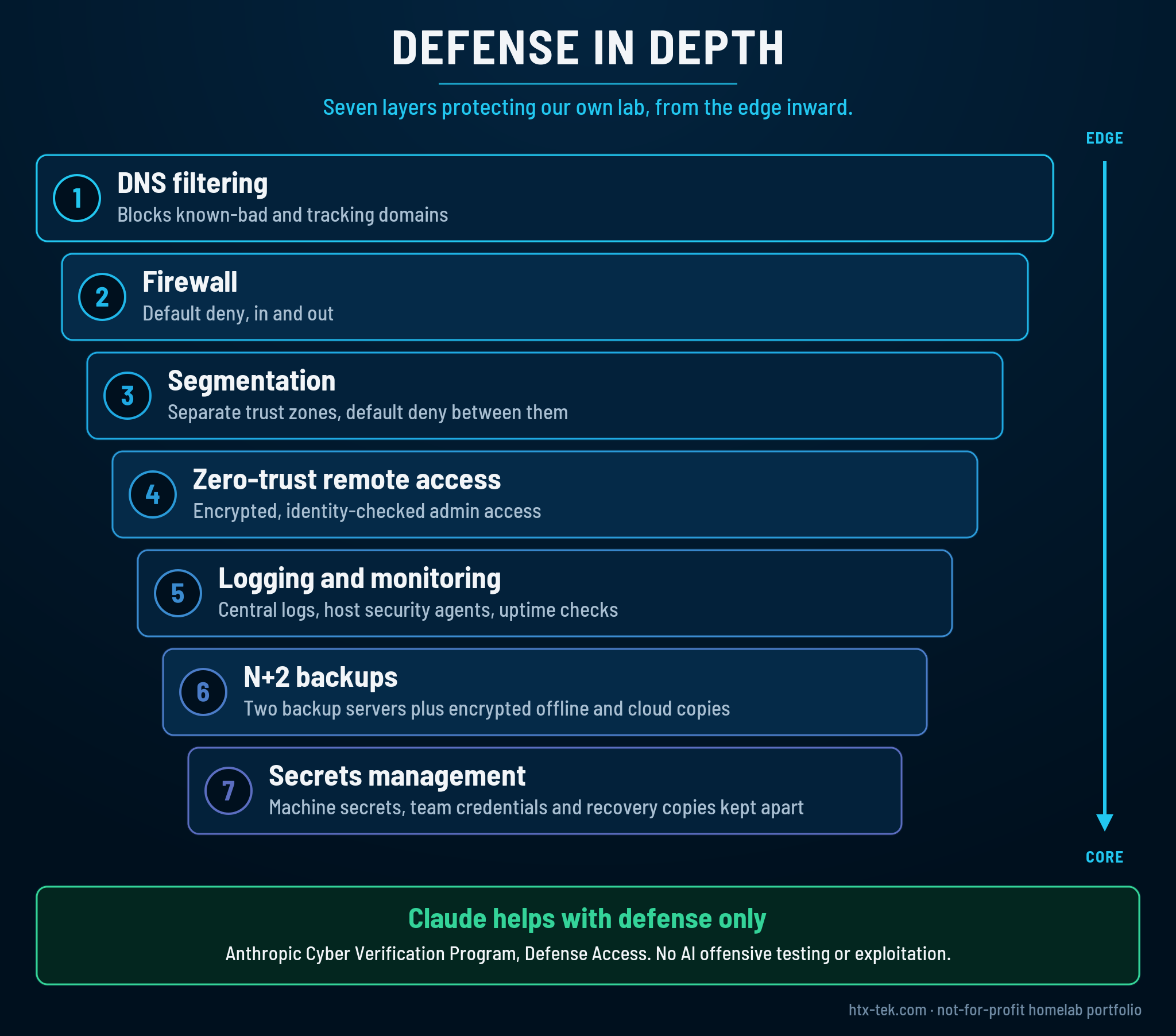
Our blue team is how we defend our own homelab every day. Seven layers do the work: DNS filtering, a default-deny firewall, segmented trust zones, zero-trust remote access, central logging and monitoring, N+2 backups and separate secrets management. People make every security decision. AI helps only with defense: triage, ATT&CK mapping, detection tuning, log analysis and fix drafts.
What does our blue team actually do?
Four things, every day: watch the lab, harden it, respond when something looks wrong, and recover when something breaks. The team is Jason and the agents in defensive roles; the CISO agent’s part is limited to defensive duties, as described on the C-Suite page. Detection and fix drafts go through the same author-plus-two review as every other change.
How does detection and monitoring work?
LiveLogs and events from across the fleet are collected in one place (Wazuh SIEM, Suricata IDS, CrowdSec), and people are alerted when something looks wrong.
A central SIEM receives logs from every node, host security agents report each machine’s file changes and processes, a network intrusion sensor watches mirrored traffic, and a community blocklist blocks known bad actors automatically. Uptime checks and metrics dashboards cover health, so a failing disk and a failing login both show up. The Command Center page shows which hosts report in.
How does DNS filtering help?
LiveLookups for malicious, tracking and unwanted domains are answered with a dead end before any connection is made (Pi-hole and Technitium).
Upstream DNS runs on redundant resolvers with blocklists, so one resolver can fail without taking the household offline. The build is written up in clustered DNS with zero family downtime.
Why is the network segmented?
In progressSo that a problem in one part of the network cannot easily reach the rest.
Separate trust zones hold core infrastructure, management, agent workloads and untrusted and IoT devices, with firewall rules between them and stateful, default-deny rules at the edge. The rules for the isolated test lab are still being tightened. See how a flat network was split into zones, how isolated zones reach updates through a proxy and the training visualizer.
How does remote access stay zero-trust?
LiveAccess is granted per identity through an encrypted overlay network (Tailscale), and no admin port is open to the internet.
Tag-based, default-deny access rules decide who can reach what. Open subnet routing was replaced with tighter rules before anything went public; the reasoning is in zero trust before going public.
How do we triage logs and alerts?
LiveAn alert becomes an AI triage note, a person decides, and the fix or tuning goes through review.
The flow is alert, AI triage note (what it likely is, related events, a suggested ATT&CK technique and a suggested next step), a person’s decision, a fix or a tuning change, then close. Priority alerts reach a phone, every alert is logged, and engineering talk happens in team chat; see Communications.
What are our hardening baselines?
LiveEvery machine gets the same secure starting point, applied as code.
A common baseline is applied across the fleet as code (first applied August 8, 2026; see Software & IaC), containers run unprivileged, tokens carry least privilege, internal TLS comes from a private certificate authority, and certificates renew automatically with monitoring for any that don’t.
How are backups part of defense?
In progressBackups let us recover from an intruder or a bad change, and they are kept where an intruder cannot easily delete them.
N+2 means two independent backup servers on site, with encrypted offline drives and an encrypted cloud copy as the off-site tiers, which are still in progress. Copies use separate credentials, the cloud copy is planned to be append-only, and a backup is taken before every deploy. Restore status is exactly as stated on N+2 & Backup.
How are secrets managed?
LiveMachine secrets (OpenBao) and team credentials (Vaultwarden) live in separate stores, with copies kept apart so losing one never locks us out of another.
Machine secrets sit in a secrets manager, team credentials in a separate password vault, with an off-premises copy and an offline break-glass copy. Details are on N+2 & Backup.
What happens during an incident?
A process for our own lab, not a service. We detect, contain (isolate the zone or host), preserve evidence, eradicate, restore from backup if needed, verify the detection now fires, and write it up. Anyone can call the emergency stop. Restoring, deleting or exposing anything still needs a human approval; the full list is on Scope & RoE.
Real write-ups: when the database filled the disk and a firewall lockout.
How does AI help, and where does it stop?
The same limits apply here as on the Cyber overview and Scope & RoE pages.
| AI helps with | AI never does |
|---|---|
| Triaging scan results and attack-surface findings | Plan attacks or choose targets |
| Mapping findings to MITRE ATT&CK | Write attack or exploit code |
| Writing, reviewing and tuning detection rules | Scan, probe or verify by testing a live system |
| Analyzing logs, event streams and alerts | Launch any test or simulation |
| Drafting fixes as code and defensive documentation | Approve anything on the human-only list |
Detection and fix drafts go through the same author-plus-two-reviewers pipeline as every other change, with a backup, a dry run and automatic rollback. Changing credentials, exposing a port or authorizing any security testing stays a human decision; see Scope & RoE for the full list.
How do we know it works?
Jason also runs occasional red-team exercises himself, by hand, on his own equipment, to test these defenses (see Red Team; no AI creates or runs them). After every fix the new detection has to fire. We plan purple-team rounds that compare what was done with what our monitoring saw (see Purple Team; the first round has not run yet), and we test restores (see N+2 & Backup).
What isn’t done yet?
- Security-event correlation does not yet feed the self-healing layer.
- The first purple-team round has not run.
- The off-site backup tier is in progress.
Frequently asked questions
- What is a blue team?
- The people (and tools) who defend a system: monitoring, hardening, responding and recovering. In our lab it’s how we protect our own infrastructure every day.
- Does HTX-TEK offer blue-team or security services?
- No. This page describes how we defend our own lab. We don’t sell security services or defend anyone else’s systems.
- How is the homelab defended?
- Seven layers: DNS filtering, a default-deny firewall, segmented trust zones, zero-trust remote access, central logging and monitoring, N+2 backups and separate secrets management. Segmented trust zones and N+2 backups are still in progress; the status badges below show which layers are fully live.
- What does AI do in your defense?
- AI helps triage findings, map them to MITRE ATT&CK, tune detections, analyze logs and draft fixes. People run every active check, and no AI does offensive testing or exploitation. It never plans attacks, writes exploit code or probes a live system.
- Does AI ever attack, scan or exploit anything?
- No. People run every active check, by hand, after a human approval gate, and only against our own lab.
- Which actions always need a human?
- Spending money, public posts, outbound messages, credential changes, destructive data or backup operations, exposing a port, and authorizing any security testing. The full list is on Scope & RoE.
- What happens when an alert fires?
- The alert goes to chat, where an AI triage note says what it likely is, which events relate to it and a suggested next step. A person decides what to do, the fix or tuning goes through review as code, and the alert is closed. Priority alerts reach a phone, and every alert is also logged.
- How do backups help security?
- Backups let us recover from an intruder or a bad change. Copies are kept apart from each other, with separate credentials and append-only storage where it applies, and a backup is taken before every deploy. Restore status is on the backup page, tested or pending.
- How do you know the defenses work?
- Every fix is re-tested so the new detection has to fire. We plan purple-team rounds that compare what was done with what our monitoring saw, and we test restores. The first purple-team round has not run yet.
- What’s still missing?
- Security-event correlation does not yet feed our self-healing layer, the first purple-team round has not run, and the off-site backup tier is still in progress.
Glossary
- Blue team:
- The people and tools that defend a system by monitoring, hardening, responding and recovering.
- Defense in depth:
- Stacking several independent protections so that one failing never exposes everything.
- SIEM:
- A central system that collects logs and events from many machines and raises alerts on suspicious patterns.
- Host security agent:
- Software on a machine that reports its logs, file changes and processes to the central monitoring system.
- Network intrusion sensor:
- A sensor that watches copied network traffic for known attack patterns.
- DNS sinkhole:
- A DNS resolver that answers for known-bad domains with a dead end instead of the real address.
- Trust zone:
- A group of devices with the same level of trust, separated from other groups by firewall rules.
- Default deny:
- A firewall posture where traffic is blocked unless a rule explicitly allows it.
- Zero trust:
- Access that is granted per identity and per request, never because a device is already on the network.
- Detection rule:
- A written condition that turns matching log events into an alert.
- Triage:
- Sorting alerts by what they likely are and what to do about them, so people look at the right ones first.
- MITRE ATT&CK:
- A public catalog of attacker tactics and techniques, used here to label what a detection should catch.
- Hardening baseline:
- A common set of secure settings applied to every machine as code.
- Break-glass copy:
- An offline emergency copy of access material, used only when everything else is out of reach.
- Defense Access:
- The defense-only tier of Anthropic’s Cyber Verification Program, which limits AI use to defensive work.
Follow the build
Read the build log, see how the agents work on our AI Development Team, and how we test only our own lab on Cyber. Elsewhere: GitHub.